
High-density environments such as corporate offices, stadiums, airports, universities and shopping malls face constant Wi-Fi congestion due to:
- Thousands of devices connecting simultaneously.
- Bandwidth-hungry applications like video streaming, VoIP and cloud collaboration tools.
- Poor roaming performance when users move between access points (APs).
- Interference from multiple overlapping networks.
Why WiFi 7 is the best choice for High-Density Networks
- Multi-Link Operation (MLO): Combines multiple frequency bands to reduce congestion.
- 320 MHz Channels: Doubles the bandwidth of Wi-Fi 6E.
- 4K-QAM Modulation: Improves data efficiency and throughput.
- Preamble Puncturing: Reduces interference from neighbouring networks.
If you manage a high-density network, Wi-Fi 7 is the upgrade you need to ensure faster speeds, lower latency and a seamless user experience.
Deploying WiFi 7
Step 1: Assess Current Wi-Fi Bottlenecks
Before deploying Wi-Fi 7, analyze your existing network limitations.
- What are the busiest areas? (conference rooms, stadium seating, airport lounges).
- How many users per AP? (more than 50 per AP = congestion risk).
- What applications are consuming bandwidth? (video conferencing, streaming, AI-powered analytics).
- Where do signal dropouts or slow speeds occur?
Tools to Use:
- Wi-Fi Heatmaps (Ekahau, NetSpot): Identify coverage gaps.
- Network Traffic Analytics (Cisco DNA, Aruba Central): Monitor bandwidth usage.
- Speed Test Apps (iPerf, Speedtest.net): Measure performance under peak loads.
Step 2: Choose Wi-Fi 7 Access Points for High-Density Areas
High-density networks require enterprise-grade Wi-Fi 7 APs that support:
- Multi-Link Operation (MLO): Ensures devices connect to multiple bands at once.
- 320 MHz ultra-wide channels: Eliminates bandwidth congestion.
- AI-based load balancing: Dynamically adjusts traffic based on real-time demand.
- Zero Trust Security (WPA3-Enterprise): Protects against network breaches.
Step 3: Upgrade Switches and Cabling to prevent bottlenecks
Wi-Fi 7 is fast, but if your wired network can’t keep up, performance will still suffer.
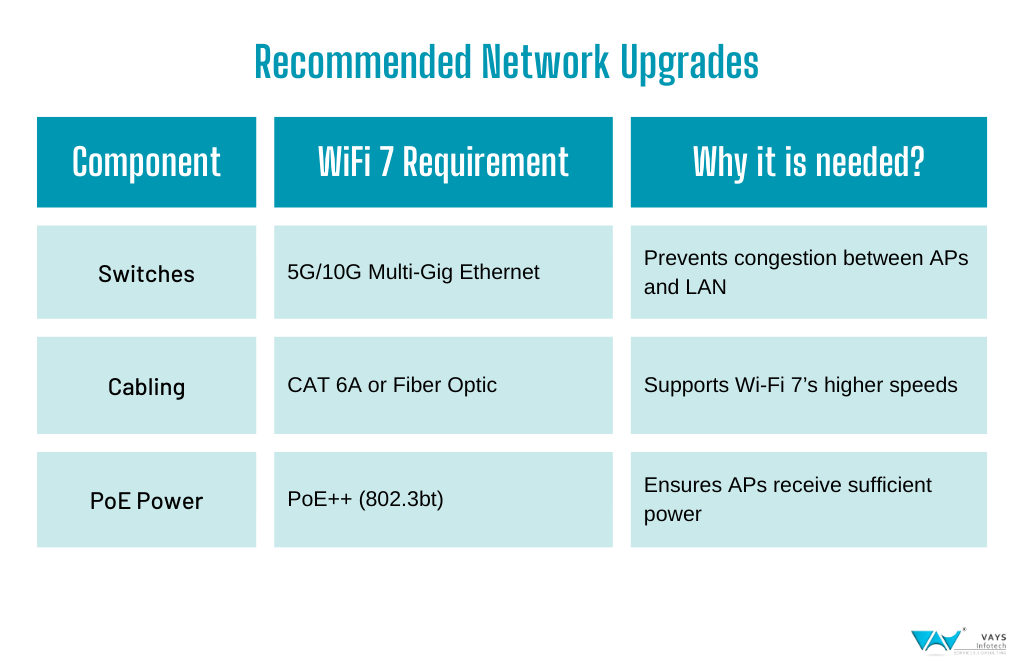
- Upgrade switches to 5G/5G/10G Ethernet to handle high-speed backhaul.
- Use Cat 6A or fiber-optic cabling for low-latency, high-throughput connections.
- Deploy PoE++ (802.3bt) switches to power Wi-Fi 7 APs efficiently.
Step 4: Optimize Wi-Fi 7 Access Point Placement
Where to Deploy Wi-Fi 7 APs in High-Density Networks:
- Office Spaces & Conference Rooms: Multiple APs to reduce congestion during meetings.
- Airports & Stadiums: Overhead APs with directional antennas for wide coverage.
- University Campuses: APs in hallways, libraries and outdoor spaces to support mobile students.
- Shopping Malls & Convention Centers: High-capacity APs placed at ceiling height for maximum range.
Best Tools for AP Placement Planning:
- Ekahau Site Survey: RF heatmaps to optimize AP locations.
- Aruba Central / Cisco DNA Center: AI-driven AP placement recommendations.
- Ubiquiti UniFi Controller: Real-time coverage visualization.
Step 5: Configure Wi-Fi 7 for Peak Performance
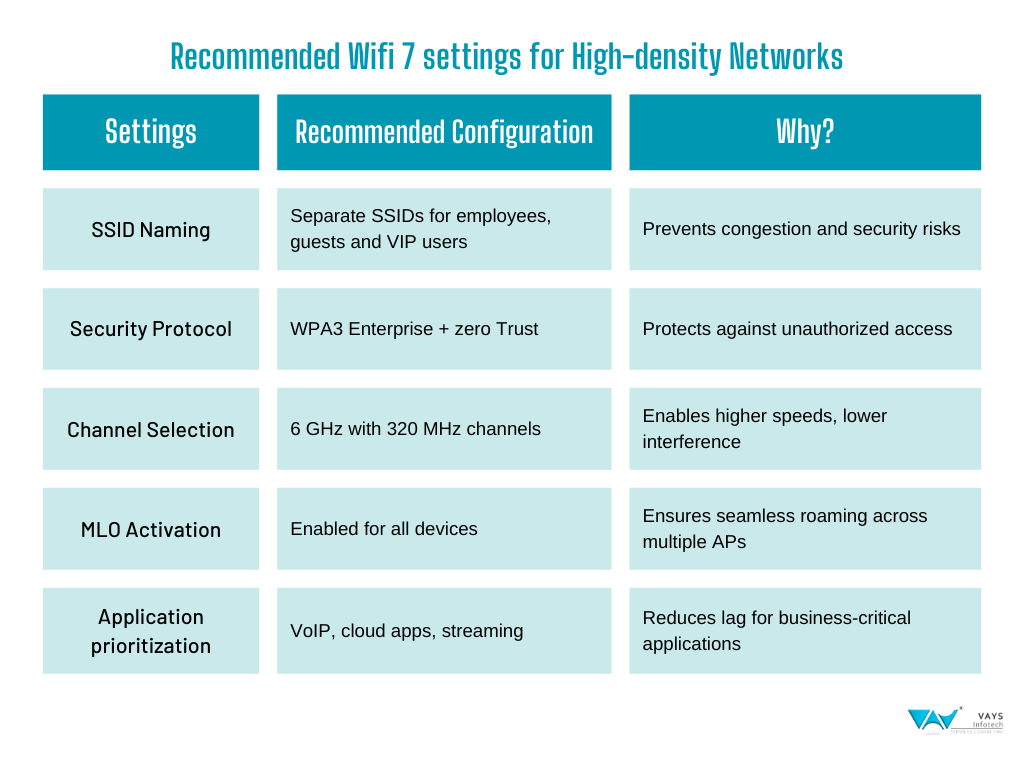
Please refer the below table for the recommended Wi-Fi 7 Settings for High-Density Networks
Step 6: Test & Monitor Wi-Fi 7 Performance in High-Density Areas
Run Speed Tests in stadium seating, conference halls, lounges, and workspaces.
Simulate Peak Traffic Loads (e.g., 500+ devices) to identify congestion points.
Monitor Real-Time Analytics via Cisco DNA, Aruba Central or Ubiquiti UniFi.
Best Tools for Wi-Fi 7 Monitoring:
- AI-driven traffic analytics (Aruba Central, Cisco DNA).
- Client Density Maps (Ubiquiti UniFi Controller).
Step 7: Educate IT Teams & Users on Wi-Fi 7 Best Practices
- Train IT staff on Wi-Fi 7’s MLO, security and performance settings.
- Provide guest Wi-Fi guidelines to prevent unauthorized access.
- Encourage employees & visitors to connect to the 6 GHz band for best performance
As workplaces, stadiums, airports and universities continue to evolve, so do their connectivity demands. Traditional Wi-Fi struggles to keep up with the growing number of devices, real-time applications and high-bandwidth workloads. Wi-Fi 7 changes the game.
By introducing Multi-Link Operation (MLO), ultra-wide 320 MHz channels and AI-driven traffic management, Wi-Fi 7 doesn’t just improve speeds, it eliminates network congestion, reduces latency and ensures seamless roaming in even the most crowded environments.
The success of a high-density Wi-Fi deployment isn’t just about installing new access points, it’s about designing a future-ready network with the right infrastructure, security, and optimization strategies. Those who adopt Wi-Fi 7 today won’t just fix their current network issues, they’ll build a foundation for the next decade of wireless innovation.
Would you like help designing a Wi-Fi 7 deployment plan for your high-density venue? Contact us today!
To know more about our Wireless LAN services, click here on Enterprise Wireless LAN